
Connect AI assistants to Imou MCP
Connect AI assistants to Imou MCP
Let MCP-capable AI agents operate Imou devices on your account through conversation.
Imou hosts an official MCP service for overseas users. Any agent that supports Model Context Protocol (MCP) with Streamable HTTP and OAuth can list devices, capture snapshots, control PTZ and motion detection settings, and query AI Insight alarms—after you sign in with your Imou account. No AppId or AppSecret in chat.
This page describes end-user OAuth MCP access. For backend or multi-tenant integrations, use the Open API and signature instead of MCP.
Quick start
Pick one of the two ways below to connect. The agent product must support MCP. Finish Imou OAuth in the browser when prompted. Devices must already be bound to that Imou account (for example in the Imou app).
MCP service URL
Overseas MCP is served at https://mcp.imoulife.com/mcp (global entry), which routes to the best regional server for your location. Enter that URL in the agent’s MCP settings, save, then sign in to your Imou account and authorize.
Some AI platforms do not follow domain redirects, which can show as an invalid URL or a failed connection. If that happens, use the row below that matches your account data center in Console → Basic information → My information. Remove the old MCP connection, switch URL, and authorize again—do not mix the global URL with a regional one.
| Account data center | MCP URL |
|---|---|
| East Asia | https://mcp-sg.imoulife.com/mcp |
| Central Europe | https://mcp-fk.imoulife.com/mcp |
| Western Americas | https://mcp-vg.imoulife.com/mcp |
Western Americas Open API uses openapi-or; MCP uses mcp-vg. OAuth does not cross regions—the configured URL must match your data center.
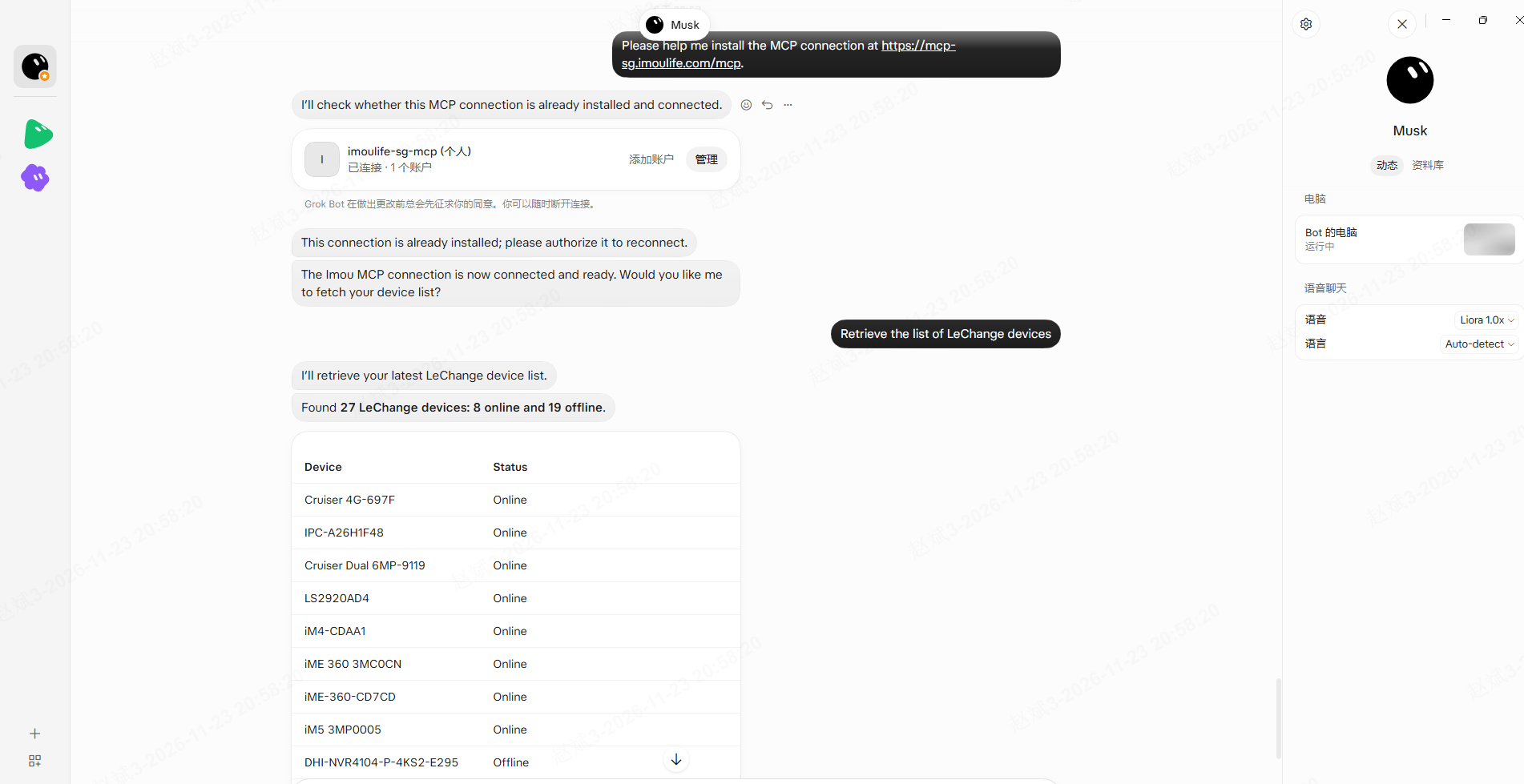
Option 1: Add through conversation
For agents that let you install remote MCP in chat, describe the service you want to add.
| Step | What to do |
|---|---|
| 1 | Send an intent such as: “Add Imou MCP at https://mcp.imoulife.com/mcp.” If the URL is invalid, use the matching MCP URL from the table above. |
| 2 | Complete Imou sign-in and consent when the agent prompts you. |
| 3 | After authorization, describe device tasks in natural language; the agent will pick tools from the list below. |
Add MCP in chat (example):
Option 2: Add through configuration
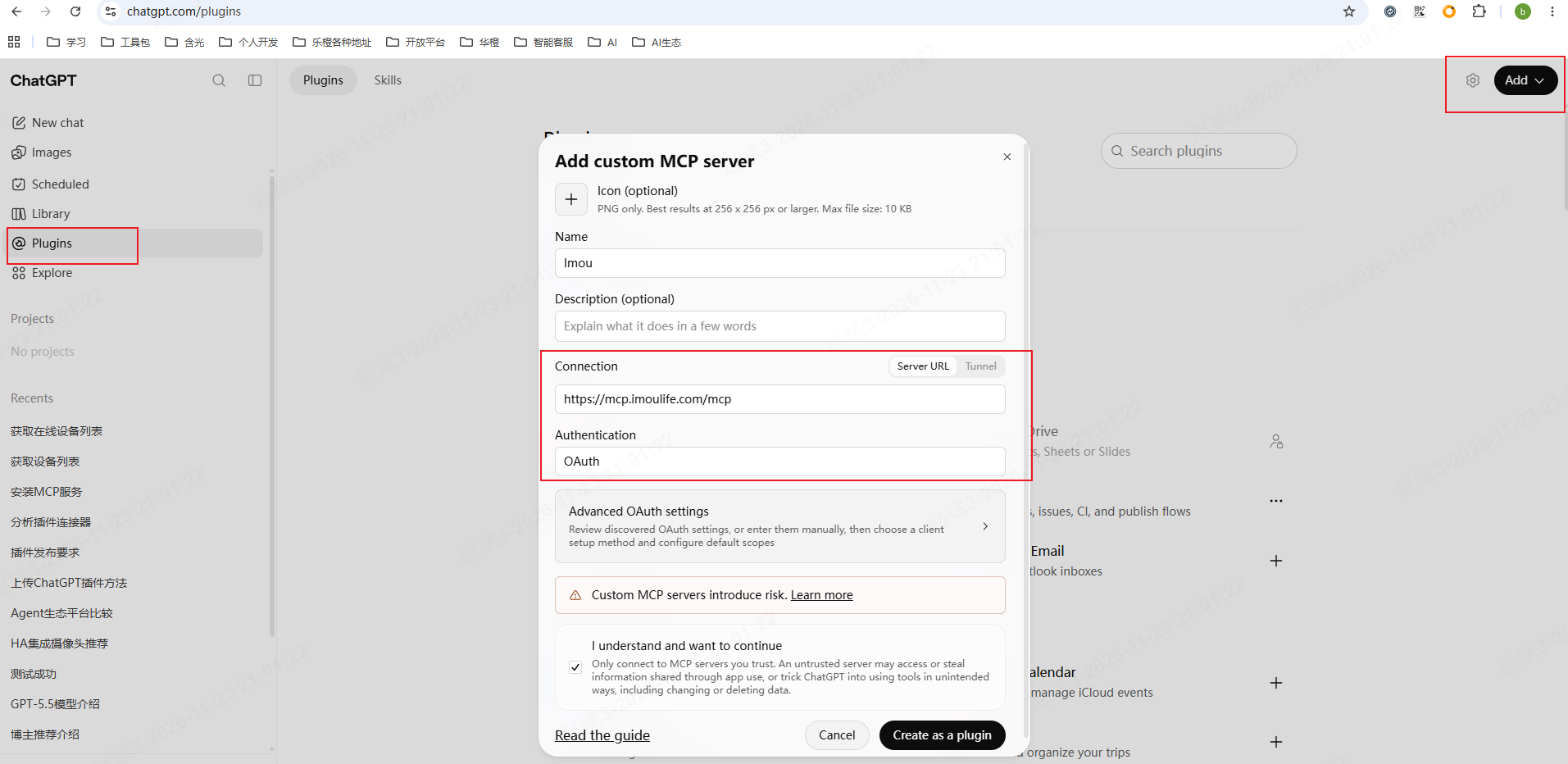
For agents with mcp.json, Cursor/Claude MCP settings, or similar, merge the JSON below and complete Imou OAuth when prompted—no AppId or AppSecret. You may rename the imou connection label per your product’s rules.
{
  "mcpServers": {
    "imou": {
      "url": "https://mcp.imoulife.com/mcp"
    }
  }
}
Use your agent’s top-level key name if it is not mcpServers. Prefer https://mcp.imoulife.com/mcp in url. If the platform does not follow redirects, replace url with the direct regional URL for your data center (table above) and re-authorize. On first connect, the agent starts OAuth; scopes are typically mcp.tools (and offline_access when refresh is supported). The agent injects the Bearer token after authorization—do not paste AppId / AppSecret.
Add a custom MCP server in the web UI (example):
What you can use it for
Device overview
Paginated device list with online status, model, SD card, and channel info.
“List online cameras on my Imou account and group them by name.”
Remote snapshot
Snapshot by device serial number; the agent returns a short-lived image URL you can open or pass to a vision model.
“Take a snapshot from the living room camera, channel 0.”
Motion detection and PTZ
Read or change motion detection on/off, sensitivity, and schedules; control PTZ.
“Show motion detection settings for the front door camera.”
AI Insight alarms and daily highlights
Query alarms in a time range; with AI Insight or related cloud storage enabled, search messages by keyword, read daily reports, and open daily quick-view highlights.
“Summarize human-related alarms on this device from yesterday.”
Capability overview
Tool names match MCP identifiers. Responses are JSON strings.
| Category | Tool name | Capability |
|---|---|---|
| Device | imou_device_list | Paginated device list and status |
| Operate | imou_operate_snapshot | Snapshot; returns image URL |
| Operate | imou_operate_ptz | PTZ pan/tilt/zoom |
| Motion | imou_motion_detection_enabled_get / _set | Motion detection on/off |
| Motion | imou_motion_detection_sensitivity_get / _set | Sensitivity |
| Motion | imou_motion_detection_plan_get / _set | Detection schedule |
| AI Insight | imou_alarm_message_list | Alarms in a time range (with AI copy) |
| AI Insight | imou_alarm_message_search | Keyword search on AI messages |
| AI Insight | imou_alarm_daily_report | Daily stats and AI safety summary |
| AI Insight | imou_alarm_ai_feedback | Feedback on AI description accuracy |
| AI Insight | imou_daily_quick_view | Daily highlight reel (clips or images) |
For HTTP-level fields and server integration, see AI Insight APIs and Manage AI Insight.
FAQ
Which AI agents can connect?
Any agent that supports MCP (Streamable HTTP, OAuth, Bearer injection) can use Imou MCP. Use Add through conversation or Add through configuration above—one Imou connection per agent is enough.
MCP vs Open API?
MCP targets conversational agents: the service calls the open platform with your OAuth identity and exposes tools. Custom backends, batch jobs, and multi-tenant products should integrate Open API directly.
Invalid URL or connection fails (redirect)?
- Open Console → Basic information → My information and note the data center (
sg,fk, oror). - Remove the existing Imou MCP connection in the agent.
- Paste the direct regional URL from the table (for example
https://mcp-vg.imoulife.com/mcpfor Western Americas) and complete OAuth again.
Most failures come from the platform not following the global redirect, not from account credentials. If the global URL works in a browser but not in the agent, use the direct regional URL.
401 or authorization errors?
Re-run Imou OAuth in the agent. If the problem persists, confirm the config uses the direct regional URL that matches your data center—do not mix global URL authorization with a regional URL for tool calls. Agents that support refresh usually renew access tokens automatically; otherwise sign in again when tokens expire.
AI Insight tools missing or empty?
Confirm the channel has AI Insight (or the required cloud package), and serial number / channel index are correct. Enable or purchase packages in Console → AI Insight service. See AI Insight concepts.
Data and privacy
You choose which agent to connect and which Imou account to authorize. After OAuth, the agent can access device data within the granted scope; actions such as PTZ or motion settings are applied to your devices or account.
Read the API privacy policy and your agent vendor’s policy on conversations and tool calls. Connect only on platforms you trust.