
IOS Standardization Demo Documentation - Imou Open Platform
1. IOS standardization Demo documentation
The IOS standardization Demo implements the audio and video-related core functions of the Lecheng Cloud Open Platform based on OpenSDK components.
It is recommended that developers read the Demo source code as a reference or transplant it to their own project, which is helpful for quick integration.
IOS standardization Demo download link
Special attention:
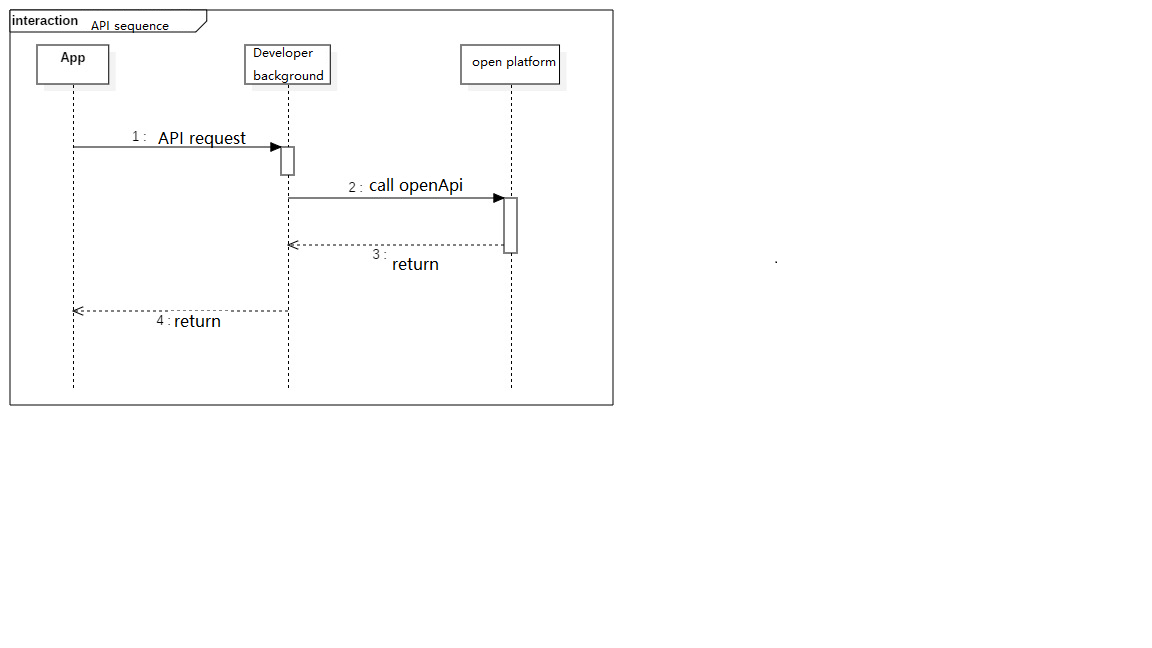
Since Demo does not have a background saas service, Demo directly requests an open platform interface on the client side to obtain data and other operations.
It is recommended that developers use the developer's back-end saas service to call the OpenApi interface of the Leorange open platform where they are involved in calling the Leorange open platform, and then return the data to the client app. The overall system architecture is built using cloud-cloud docking.
Because the developer account information: appId and appSecret is needed to call the Lecheng Cloud Open Platform interface, if the developer puts the appId and appSecret in the client (APP) code to implement this interface, once the developer's client If it is decompiled by others, there is a risk of appId and appSecret being stolen.
The process is as follows:
2. Function description
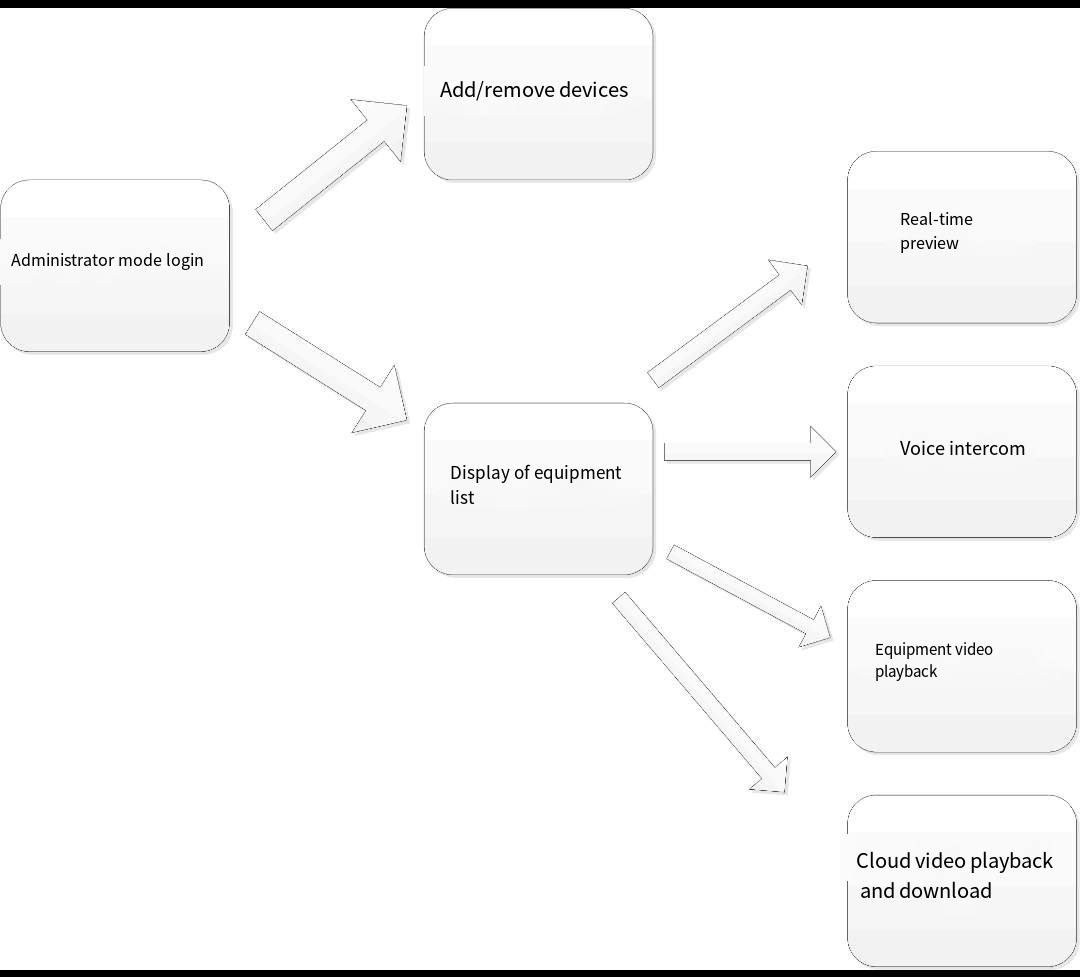
The main functions implemented by iOS LCOpenSDKDemo include:
Login in administrator mode
Get device list
Add/remove devices
Real-time preview
Voice intercom
Equipment video playback
Cloud video playback and download
3. Environment Setup
Take Demo as an example to introduce the project configuration for developers.
Demo project supports compiling and debugging above Xcode11 version.
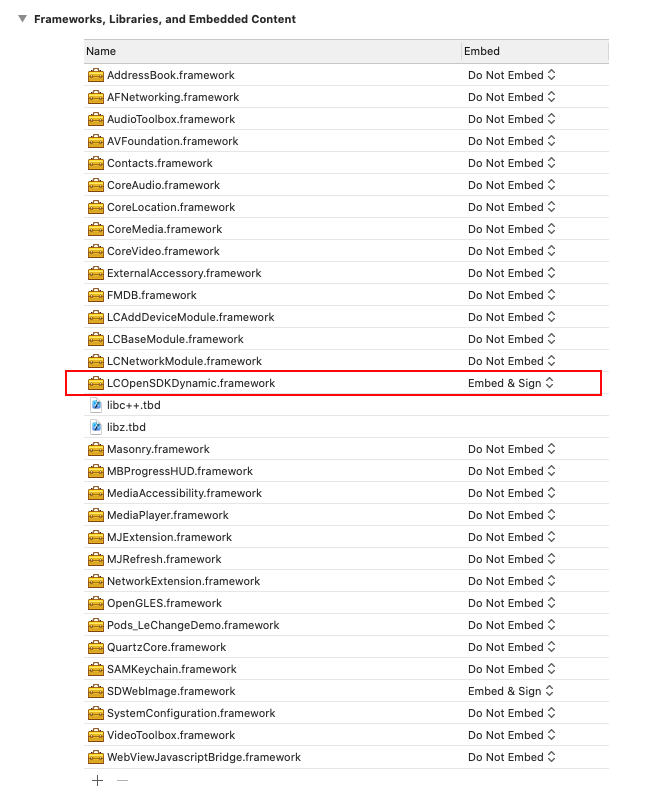
Currently LCOpenSDK imports project references in the form of framework, and Embed&Sign needs to be checked. The framework is located in the Depend/Frameworks/iOS directory, and the header files are located in the LCOpenSDKDynamic.framwork/Headers directory:
3.1 The project depends on the system library
CoreAudio
MediaPlayer
AudioToolbox
VideoToolbox
OpenGLES
MediaAccessibility
CoreVideo
AVFoundation
CoreMedia
libz.tbd (libz.dylib)
3.2 The project relies on third-party libraries
KVOController (key value monitoring)
Masonry (OC constraint layout)
SnapKit (Swift Constraint Layout)
ZXingObjc (Code Scanning Library)
AFNetworking (Network Request Library)
MJExtension (model data conversion)
MJRefresh (Up and Down Control)
SAMKeychain (Keychain storage tool)
SDWebImage (picture loading frame)
MBProgressHUD (waiting to rotate control)
FMDB (Database Framework)
GTMBase64 (encoding library)
Please select the corresponding version of the third-party library for use according to the current Xcode version. Xcode 11 and 12 can be copied and imported directly from the Demo.
3.3 Xcode project configuration
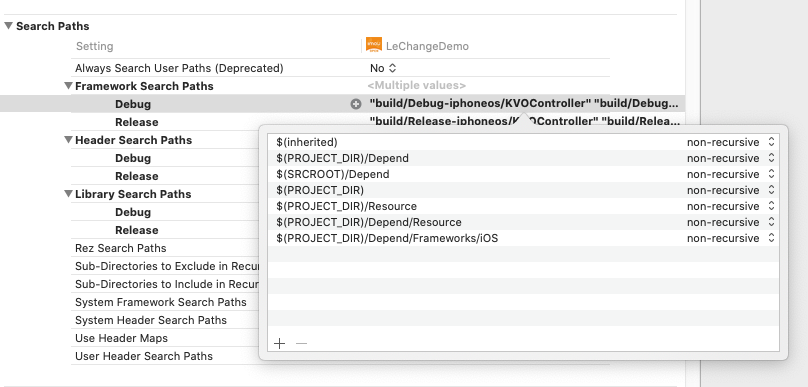
Path: Build Setting->Search Paths->Framework Search Paths
Add: $(PROJECT_DIR)/Depend/Frameworks/iOS, support framework automatic retrieval
Path: Build Setting->Search Paths->Framework Search Paths
Add to:
$(PROJECT_DIR)/Depend/Frameworks/iOS/LCOpenSDKDynamic.framework/Headers
$(PROJECT_DIR)/Depend/Frameworks/iOS/LCOpenSDKDynamic.framework/Headers/LCOpenSDK
$(PROJECT_DIR)/Depend/Frameworks/iOS/LCOpenSDKDynamic.framework/Headers/LCOpenNetSDK
$(PROJECT_DIR)/Depend/Frameworks/iOS/LCOpenSDKDynamic.framework/Headers/LCOpenApi
Path: Build Phases ->Embed Frameworks
Add: LCOpenSDKDynamic.framework, Destinations select Frameworks.
Path: Build Setting ->Search Paths->Library Search Paths
Add: $(PROJECT_DIR)/Depend
3.4 Engineering related
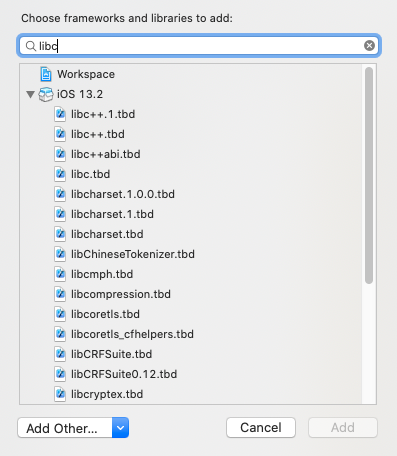
Add the SDK dynamic library and header files to the XCode (version 11.0 and above) project to ensure that they are correctly referenced, the c++ standard library selects libc++, and the project settings are mixed (required to support C++ calls). For details, please refer to Demo;
Remarks: appId and appSecret need to be obtained from the open platform website (the developer can find it in the open platform website-development center-application details page after creating the application).
4. Admin account simulation login
As shown in the figure below, Demo will log in first before getting the device list:
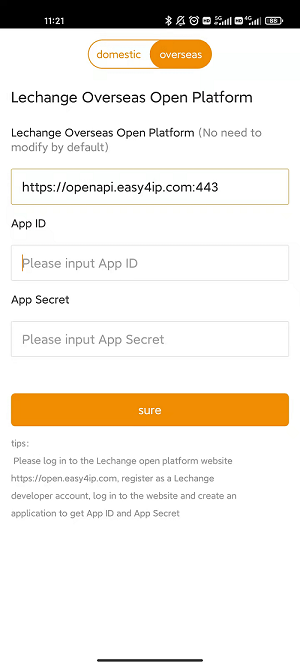
Before obtaining the administrator device list and performing device operations, you need to obtain the accessToken (administrator token). We call the process of obtaining the accessToken as the administrator account simulation login process. After obtaining the administrator token, directly enter the device list interface.
The source code of IOS Demo has helped developers to implement the code of the "accessToken" interface. For details, please refer to the accessTokenWithsuccess function in the LCAccountInterface.m file.
5. Get device list
After the simulated login, you can call the Device Query interface to obtain the device list information.
It is recommended to cache the device list information, such as device ID, device name, device capability set, whether the device is online, etc., for subsequent real-time preview, video query and other operations.
6. Device initialization & device wireless network configuration & device binding & device unbinding
The device binding process is as follows:
Obtain the current Wifi hotspot information of the mobile phone, turn on the device network configuration function according to the manual, call LCOpenSDK_ConfigWifi::configWifiStart to configure the device wirelessly, and after receiving the network configuration callback event (regardless of whether the network configuration is successful or timeout), call LCOpenSDK_ConfigWifi::configWifiStop stops wireless network configuration, and the device can only proceed with the subsequent binding process if the network is successfully configured and connected to the easy4ip open platform;
Search device initialization information, refer to LCOpenSDK_SearchDevices::startSearchDevicesWithDeviceId;
If the device supports initialization and has not been initialized (LCOpenSDK_DeviceInit::DEVICE_INIT_INFO::initStatus=1), call LCOpenSDK_DeviceInit::initDevice to initialize the device;
Check if the device is bound, call the checkDeviceBindOrNot interface of the Lecheng Cloud Platform;
Check if the device is online, call the deviceOnline interface of the Lecheng Cloud Platform;
To bind the device, call the bindDevice interface of the Lecheng Cloud Platform;
Unbind the device and call the unBindDevice interface of the Lecheng Cloud Platform.
Remarks: LCOpenSDK_DeviceInit::DEVICE_INIT_INFO::initStatus=2 means that the device supports initialization and has been initialized LCOpenSDK_DeviceInit::DEVICE_INIT_INFO::initStatus=0 means the device does not support initialization
6. Real-time preview
For the specific implementation of real-time preview, please refer to the Demo source code, and for the involved interfaces, please refer to the startPlay function in LCLivePreviewPresenter+control.m.
7. Voice intercom
For the specific implementation of voice intercom, please refer to the Demo source code, and for the involved interfaces, please refer to the onAudioTalk function in LCLivePreviewPresenter+control.m.
8. Equipment recording query & playback
The device video query needs to call the open platform queryLocalRecords interface.
For device video playback, please refer to the startPlay function in the Demo source code LCVideotapePlayerPersenter+Control.m.
Remarks: The device video query can only be in days, that is, the start time and end time of the query cannot span days, otherwise the query timeout error will easily occur.
9. Cloud Recording Query & Playback
For device cloud recording query, the open platform queryCloudRecords interface must be called.
For cloud video playback, please refer to the startPlay function in the Demo source code LCVideotapePlayerPersenter+Control.m.
10. PTZ control & window movement
Use the open platform interface controlMovePTZ to move the pan/tilt up, down, left, and right. For details, please refer to the Demo source code LCLivePreviewPresenter.m file.
11. Matters needing attention
Since Demo has implemented most of the monitoring and security functions, it can already meet the basic needs, but please do not upload it directly to the AppStore.
When the app is launched, there will be a machine review of the code repetition rate and a manual review of the interface similarity. If the repetition similarity is found to be high, the following prompt will be displayed:
Guideline 4.3-Design
Your app duplicates the content and functionality of apps currently available on the App Store.
Therefore, we encourage developers to make code/interface adjustments based on the open platform Demo, or complete development based on openSDK/open platform API.