IMOU MCP SERVER · AI-READY CAMERAS

Talk to Your Cameras. Control Your Devices. Understand Every Event.

Connect your IMOU devices to compatible AI assistants through MCP and OAuth. Check device status, configure camera settings, find historical alarm events, and explore security insights — all using natural language.

Talk to Your Cameras. Control Your Devices. Understand Every Event.

A simpler way to use your cameras

Bring Your IMOU Devices into the AI Era

Connect an AI assistant and use everyday language to access supported IMOU Open Platform capabilities — without building a custom interface for every task.

Device ManagementCamera ControlMotion DetectionAI Event SearchSecurity AnalyticsAI Feedback

What Can You Do with IMOU MCP?

From everyday device operations to AI-assisted event investigation.

  • Device Management

    Get an overview of your connected camera fleet.

    • Paginated device list
    • Online/offline status
    • Camera snapshots and image URLs
  • Camera Control

    Operate supported camera functions through AI.

    • PTZ directional control
    • Zoom in/out
    • Supported device operations
  • Motion Detection Settings

    Read and configure supported detection settings.

    • Detection on/off
    • Sensitivity levels
    • Detection schedules
  • AI Event Search

    Find relevant historical alarm messages faster.

    • Time-range alarm retrieval
    • AI description access
    • Keyword search in AI insights
  • Security Analytics

    Turn alarm data into understandable summaries.

    • Daily alarm statistics
    • Event type breakdown
    • AI risk analysis from available data
  • AI Description Feedback

    Report inaccurate AI-generated event descriptions.

    • Submit feedback for a specific alarm
    • Reference the relevant event time

See What You Can Ask AI to Do

Practical scenarios for developers, integrators, and camera users.

USE CASE 01

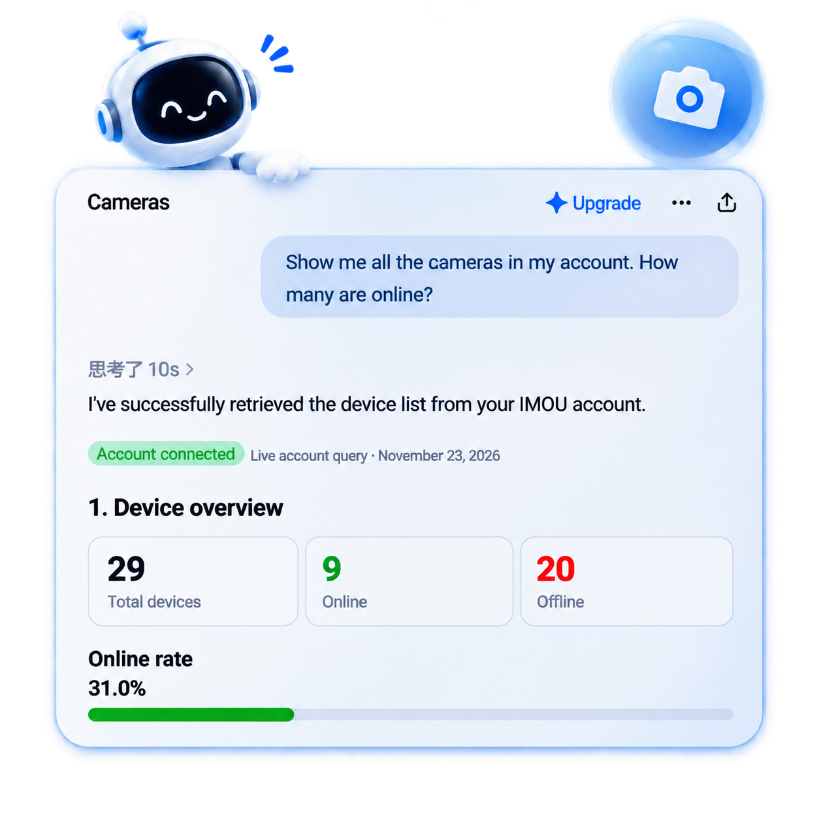
Manage Multiple Cameras Through AI

Check the status of authorized devices and retrieve a snapshot from a specific camera — without browsing device lists one by one.

Paginated device listDevice statusSnapshot retrieval
USE CASE 02

Control Cameras & Configure Motion Detection

Adjust supported PTZ functions and motion detection settings using simple instructions.

PTZ controlDetection switchSensitivitySchedule

USE CASE 03

Find Historical Events Using AI Descriptions

Search available historical alarm messages by time and keywords in their AI-generated descriptions.

Time-range alarm messagesAI insight keyword search

USE CASE 04

Understand Daily Alarm Activity

Turn daily alarm statistics into an easy-to-understand overview and ask AI to highlight potential concerns.

Daily statisticsEvent categoriesAI risk analysis

From Natural Language to Device Actions

IMOU MCP connects AI assistants with supported Open Platform capabilities through a standardized tool interface.

  • 01 · YOUR REQUEST

    Ask

    Describe the information or operation you need in everyday language.

  • 02 · AI ASSISTANT

    Understand

    The assistant interprets your request and selects relevant available tools.

  • 03 · IMOU MCP

    Execute

    The assistant invokes tools through your authorized connection.

  • 04 · YOUR RESULT

    Respond

    Receive device information, snapshots, alarm messages, statistics, or operation results.

Connect Your Preferred AI Assistant

Use IMOU MCP with compatible AI applications and development environments. Connection methods and availability may vary by client.

  • ChatGPTChatGPT
  • ClaudeClaude
  • GeminiGemini
  • GrokGrok
  • Grok BotGrok Bot
  • CodexCodex
  • Claude CodeClaude Code
  • CursorCursor
  • CopilotCopilot
  • DeepSeekDeepSeek

OAuth authorization

Your Account. Your Permission.

IMOU MCP uses OAuth authorization to connect compatible AI clients with your IMOU Open Platform account.

  • Authorize access through the supported OAuth flow.
  • Use capabilities available to the authorized account.
  • Interact with devices accessible through that account.
  • Review and revoke authorization through supported account controls.

FAQ

What is IMOU MCP Server?

It enables compatible AI applications to interact with supported IMOU Open Platform device and cloud capabilities through the Model Context Protocol.

Do I need programming skills?

No. Connect a compatible AI client and interact with supported capabilities using natural language.

Can I control my camera using AI?

Supported operations include PTZ movement and motion detection configuration, provided the device supports the requested function.

Is IMOU MCP free?

MCP connectivity and individual Open Platform resources may have different pricing and usage policies. Refer to the official pricing page for applicable charges.

Make Your IMOU Devices AI-Ready

Connect. Authorize. Ask. Discover a simpler way to interact with your cameras.